📝 Performance of Different Shaders in ASP
Static Branching in ASP/Character and ASP/Eye
The ASP character and eye shaders are both forward rendering shaders that use shader keywords to perform static branching. For example, if a material using ASP/Character does not use the Fresnel rim light or depth-based rim light under the rim lighting category, then the material will never perform rim lighting calculations at runtime. Similarly, if a texture property is not used, there will be no texture sampling for that texture. Therefore, the fewer features enabled for a material, the less runtime computational overhead there will be.
Texture Sampling Count (Important)
In general, when optimizing a shader, we want to minimize the number of textures passed to the GPU each frame. This can be done by reducing the number of skinned mesh materials and packing the textures use by different material into a single atlas.
In theory, we can merge the ramp maps of different material into a single ramp map atlas, and use another look-up texture or vertex color to control the UV values of the ramp map atlas sampling. This approach is commonly used in some mobile games, such as Genshin Impact.
However, this usually requires a strict production workflow and rules to be tailored to the specific needs of the project. As a plugin used for different projects, ASP cannot force users to follow a specific process in order to maintain flexibility.( The only exception is the channel of PBR textures. )
In the case of using independent textures for each material, the trade-off is higher bandwidth overhead, which is less friendly to GPUs for mobile device such as phones, VR, and Switch. Therefore, the default target of ASP has always been limited to PC.
💡 In fact, the logic of merging/lookup textures is not complicated, and for teams with enough resources and wants to target mobile platforms, ASP shaders can still be used as a toon rendering base shader and further modified and extended.
Self-Shadow Removal Performance
Cube Proxy (Recommended)
The Cube Proxy creates no additional shadow texture, cascade, or character ShadowCaster draw call. When enabled, ASP/Character and ASP/Eye calculate one ray-AABB intersection per visible character pixel and sample Unity's main-light shadow map at the proxy surface. Its cost therefore scales primarily with the character's on-screen pixel coverage, not the number of Skinned Mesh Renderers.
💡 Keep the Cube Proxy tight around the character for correct external-shadow classification. If a character does not need self-shadow removal, disable the option in the ASP Character Panel to skip this work. Unity 6.5 provides only this method.
ASP ShadowMap (Legacy; Unity 2022.3, 6.0, and 6.3 only)
ASP Shadow Map can render up to four layers of cascade shadow maps.
Cascade shadow map can be thought of as a LOD of shadows. It divides the shadow map into multiple smaller tiles, and each tile is rendered with a different shadow distance. A higher cascade count can achieve more consistent shadow quality between different distances while maintaining a small shadow map resolution.
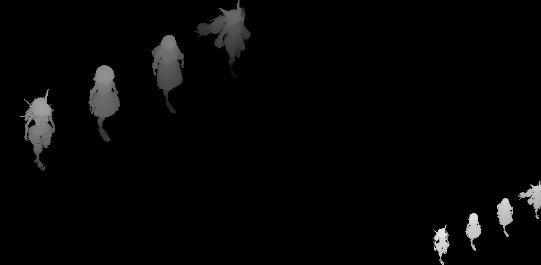
A 2-cascade shadow map
However, each additional cascade layer requires an additional draw call. In the worst case, 4 cascades require the character to be rendered to the shadow map 4 times. In addition to the fact that skinned meshes used for characters usually have a higher number of faces, skinned meshes themselves have a high overhead on the CPU side (calculating rig-bones is a very expensive operation). Using multiple cascades can easily lead to CPU bound.
💡 Please note that the skinned mesh renderer commonly used for the characters in game projects is a computationally expensive object.
| Scenario | Recommended Settings |
|---|---|
| CPU-bound but sufficient bandwidth | Lower Cascade Count, keep cascade count to 1 or 2, use larger shadow map resolution (2048x2048). |
| Bandwidth-bound | Use smaller shadow map resolution |
| Pursue the performance | Use 1 layer cascade, and smaller shadow map resolution, lowering clip distance to improve shadow quality at close range. Use high shadow fade ratio to fade out shadows when the camera is away, and switch to fake blob shadow when far away (not currently included in ASP) |
Mesh Outline/ Depth Offset Shadow
The mesh-based outline pass and depth offset shadow pass are like regular draw calls (of course, the per-pixel computation of these passes is very low). Therefore, the execution time of these passes is directly proportional to the total number/complexity of objects to be render.
Therefore, please make use of the Rendering Layer Mask/Layer to control the objects that will be rendered to these passes, minimizing the number of renderers that are drawn into these passes.
Post-Processing Shaders (Screen Space Outline, Tone Mapping)
On an RTX 3060 laptop, this is a performance comparison of ASP's post-processing passes and Unity's SSAO pass.
| Post-processing shader | Execution time |
|---|---|
| Unity SSAO | 0.6ms~0.95ms |
| ASP Screen Space Outline | depend on character pixel coverage on screen usually 0.4ms~0.5ms , worst case 0.95ms |
| ASP ToneMapping | 0.2ms |
When calculating screen space outlines, we need to sample the _CameraDepthTexture and _CameraNormalTexture multiple times to maximize the detectable edge details. At the same time, we need to sample the Material Pass's RT. The number of samples used for ASP edge detection is about half that of the Sobel operator. However, the details obtained will not be less than those shader which using the Sobel operator.
When Enable Scene Object Outline is disabled, the screen-space outline shader first determines whether the current pixel belongs to an ASP character and skips unnecessary scene-pixel work. A lower character screen coverage therefore usually costs less. When Enable Scene Object Outline is enabled, Depth and Normals edges also process non-character geometry with valid scene depth and normals, so the cost becomes closer to a full-screen pass.
The current Screen Space Outline uses one full-resolution path. It has no quality enum, half-resolution mode, or separate outline-only FXAA pass. Disable edge types you do not need, and enable Enable Scene Object Outline only when the scene also needs outlines. Tone Mapping runs only while the Volume override beside Tone Map Type is active; it requests the Material Pass and character-depth inputs only when Ignore Character Pixels is enabled.
Profiling Results
The following is the nsight frame capture of a scene with 9 characters (36 Skinned mesh renderers) on an RTX 3060 laptop:
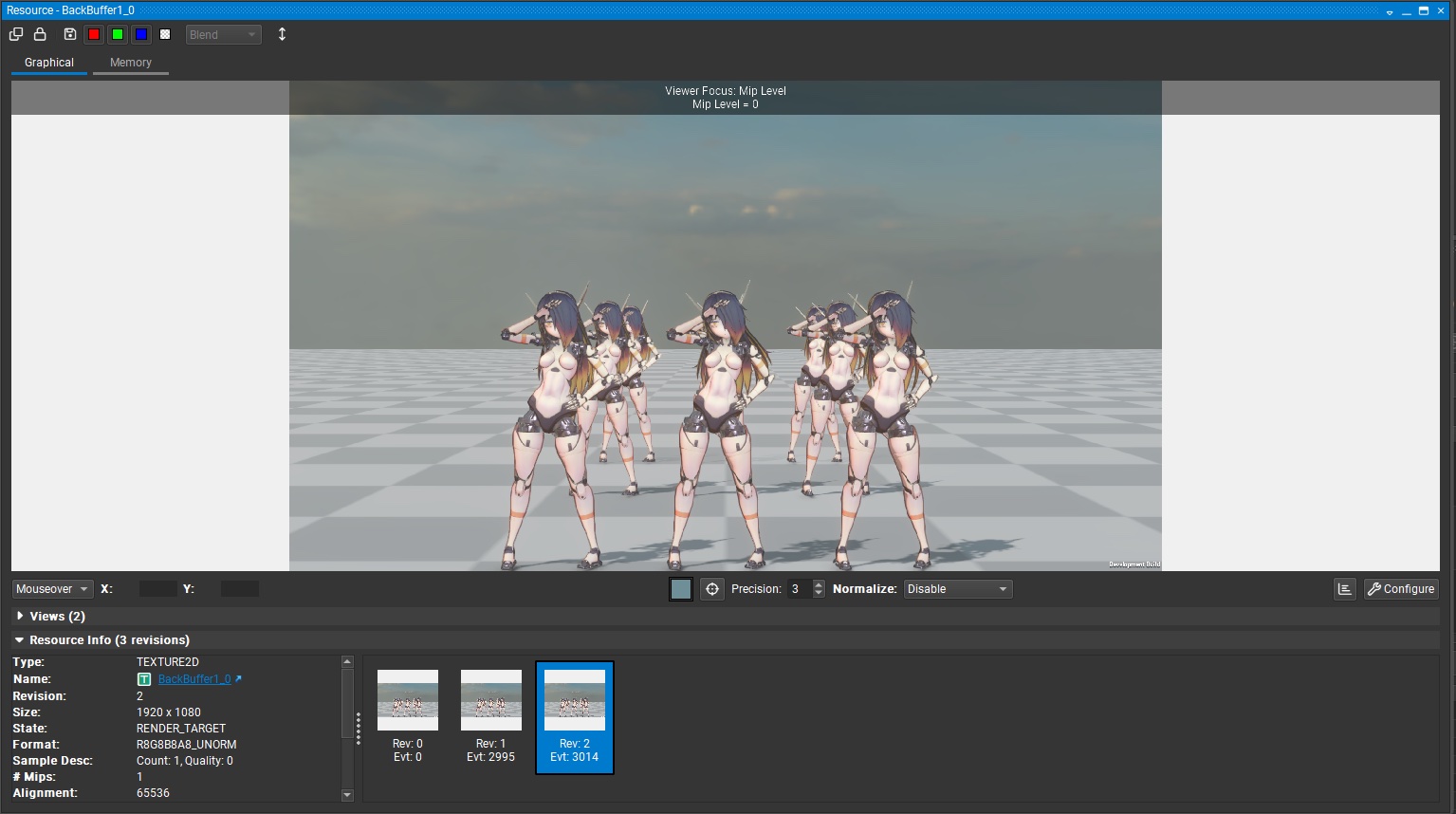
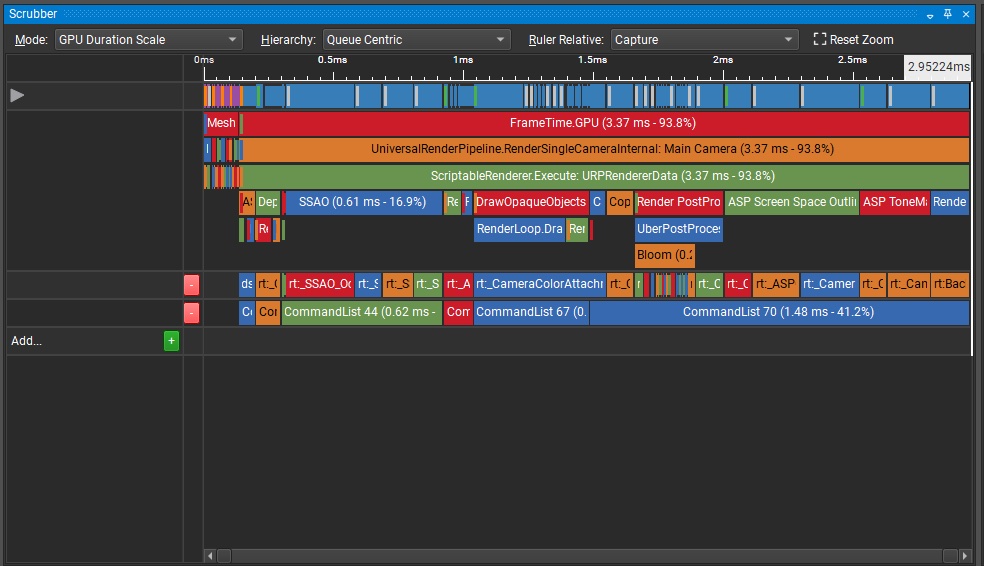
Project Setting : Script Backend - Mono
Graphics API : DX 12
GPU Skinning : ON
Graphics Jobs : OFF
| GPU Pass | Frame Time |
|---|---|
| Unity SSAO | 0.61ms |
| ASP Shadow Map (Legacy; unavailable on Unity 6.5) | 0.07ms |
| Draw OpaquesObjects | 0.45ms |
| ASP Tone Map Pass | 0.27ms |
| ASP Screen Space Outline | 0.61ms |
| Render Post Processing(Bloom..etc) | 0.35ms |
| Total Frame Time | 3.37ms (~270FPS) |
Draw OpaquesObjects will be affected by the number and complexity of meshes, the number of faces, and the number of draw calls.
If we ignore the impact of mesh complexity, ASP Screen Space Outline is the relatively expensive shader in ASP. Outline and ToneMapping takes about 0.8~1ms in total on a 3060 laptop.