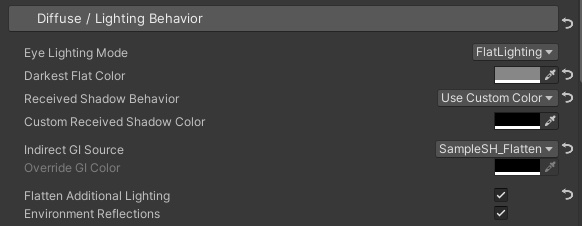
| Determines the eye lighting model. There are two modes: Lambert and Flat. |
| Regular Lambert Diffuse lighting. |
| Flattened lighting, each pixel of the object will change uniformly based on the direction of the light source. |
| When using the Flat Lighting mode, override the darkest color by this property |
| Controls how the shadow color is behave when receiving shadows from the ShadowMap. |
| Can be selected in Lambert Lighting mode, uses the default Unity shadow color as the shadow color. |
| Can be selected in Flat Lighting mode, uses Darkest Flat Color as the shadow color. |
| Uses Custom Received Shadow Color as the shadow color. |
| Controls the environment indirect lighting received by the current pixel. If the scene lighting is baked, the source of indirect GI will be the spherical harmonic lighting information stored in the light probe. If there is no baking, the source of this spherical harmonic lighting will be the skybox. |
| Use the indirect GI obtained by sampling the spherical harmonic information. |
| Flatten the sampled spherical harmonic lighting, the indirect GI obtained by sampling the entire material will be a single color. |
| Do not sample environment lighting, use Override GI Color instead. |
| A specified color to replace environment lighting. |
| Whether to flatten the lighting results from additional lights |
| Whether or not to include indirect specular lighting from the PBR model in indirect GI. (In Unity, the reflection source will be the result of sampling a nearby reflection probe or the skybox if no reflection probe present) |