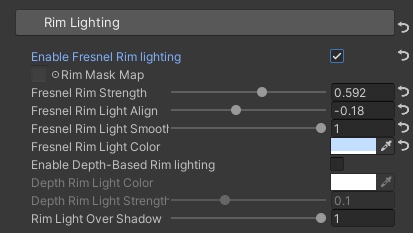
6️⃣ Rim Lighting
| Property Name | Description |
|---|---|
| Enable Fresnel Rim lighting | Whether to enable Fresnel rim lighting |
| Rim Mask Map | Mask Texture for rim lighting, sample the mask’s R channel, 0 means no rim lighting at all for that pixel |
| Fresnel Rim Strength | Controls the strength of the rim light, with a range of 0 to 1. |
| Fresnel Rim Light Align | Controls the alignment between the rim light and the main light source, with a range of -1 to 1. The default value is 0. When set to 0, the rim light will appear evenly around the edges of the object. When set to 1, the rim light will appear along the same direction of the main light source, i.e. the edges of the object facing the light. When set to -1, the rim light will be in the opposite direction of the main light source, i.e. the edges of the object facing away from the light. |
| Fresnel Rim Light Smoothness | Controls the softness of the rim light, with a range of 0 to 1. |
| Fresnel Rim Light Color | Controls the color of the rim light |
| Enable Depth-Based Rim lighting | Whether to enable rim lighting calculated with the depth buffer. |
| Depth Rim Light Color | The color of the depth-based rim light |
| Depth Rim Light Strength | The strength of the depth-based rim light |
| Rim Light Over Shadow | The blending strength of the rim light over the shadow, When set to 0, the rim light will be covered by the shadow. When set to 1, the rim light will override the shadow (similar to emission). |