2️⃣ Surface Options
This page applies to the shared Surface Options currently used by both ASP/Character and ASP/Eye.
Properties
| Property Name | Description |
|---|---|
| Alpha Clipping | Controls whether to enable Alpha Test. Pixels with a texture alpha value (or Dithering) lower than the threshold will be discarded. |
| Alpha Clipping Threshold | The threshold for Alpha Clipping |
| Clip Map | An extra clipping mask texture. This becomes available when Alpha Clipping is enabled and is commonly used for hair strands, torn edges, or other localized cutout control. |
| Clip Map UV | Controls which UV set is used by the Clip Map. |
| Dithering Factor | The strength of the Dither pseudo-transparency effect. Alpha Clipping must be enabled before using this. |
| Dither Pixel Size | The size of the dither pattern in screen pixel unit. |
| Surface Type | Surface type (transparent or opaque ) |
| Render Face | The mesh face to be rendered (Front, Back, Both) |
| Perspective FOV Offset | Controls the effect of correcting the perspective projection FOV deformation. The default is 0 for no correction, and adjusting to 1 will approach orthographic projection. |
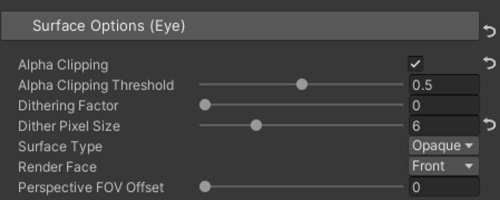
💡 The Perspective FOV Offset and Dithering Factor of all materials of the current character can be uniformly set and managed in the UI of the ASP Character Panel. This allows for easier management of material parameters.