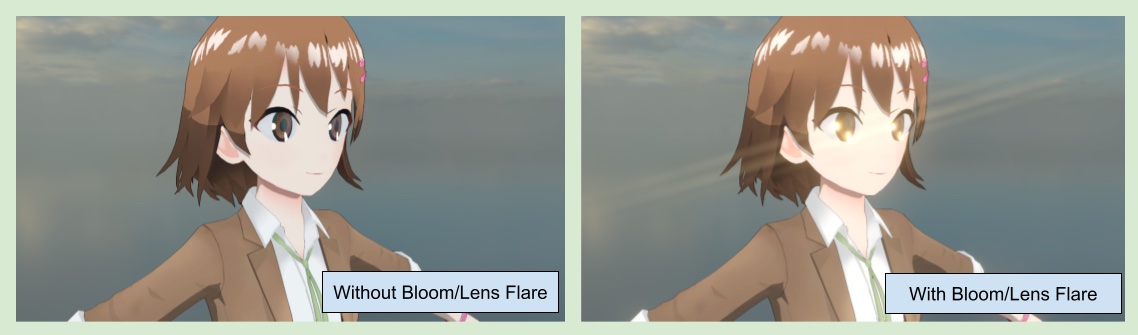
☀️ 18.移植至Unity2021/2022的Screen Space Lens Flare(實驗)
關於Screen Space Lens Flare
Unity 2023開始,開始有內建於SRP的Screen Space Lens Flare這一後處理特效。
https://youtu.be/-6zbFTBMDmU?t=128
我個人很喜歡這一個效果,於是決定把此功能移植至較早的Unity版本,讓即使是Unity 2021/2022的使用者也能使用這一功能,Screen Space Lens Flare依賴於Blooom最終產出的RT,因此必須把開Bloom才能生效。
因為是用有點hacky的方式往前移植,這個功能被歸類於實驗性質,現階段我無法保證此功能在2021/2022的editor/build出的執行檔中沒有bug。
💡 目前已知的問題是在某些情況下且screen space lens flare volume內的streak threshold過低時,在editor內移動滑鼠會有閃爍的問題。
設置Screen Space Lens Flare Renderer Feature
💡 如果你是使用Unity 2023/ Unity 6的使用者,請直接忽略這一頁,
並根據 Unity官方的說明 在Volume中設定官方的Screen Space Lens Flare就好。
在當前的URP Renderer Data中,加入screen space lens flare feature。
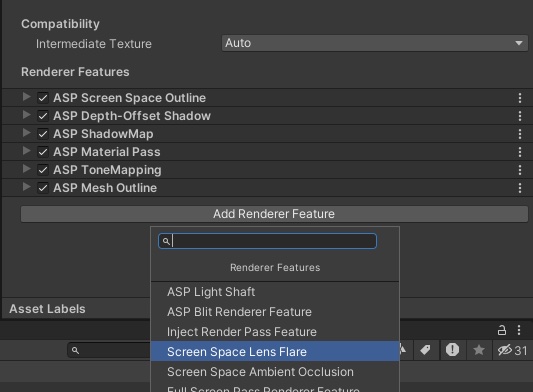
加入後,確保Inject Point 設置為After Rendering Post Processing。

接著到當前的volume中點擊Add Override按鈕並且選擇ASP Screen Space Lens Flare
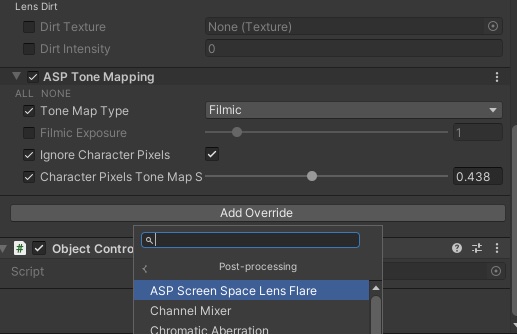
開啟bloom與調整相關參數,即可獲得screen space lens flare。