9️⃣ 陰影設定 Shadows
💡 關於Built-In Shadow、Cube Proxy、ASP ShadowMap (Legacy)與Depth Offset Shadow的詳細說明與設定方式,請參考 🦇 人物陰影設定 - ASP的陰影方案 (更新1.3 - 2025/11)。
⚠️
Receive Extra Shadow From ASP ShadowMap只在仍包含ASP ShadowMap的Unity 2022.3、6.0與6.3版本中有效。Unity 6.5僅使用Cube Proxy移除角色自陰影。
| 參數名稱 | 說明 |
|---|---|
| Receive Built-In Shadows | 是否接收來自Unity預設ShadowMap的陰影。 |
| Receive Extra Shadow From ASP ShadowMap | 是否接收來自ASP的角色陰影。 |
| Receive Extra Shadow From Offsetted Depth Map | 是否接收ASP材質的深度偏移陰影。 |
| Depth Offset Shadow Pixel Distance | 深度偏移陰影的偏移距離。 |
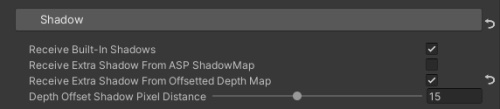
💡 上面三種Shadow的開關可以從每個材質球個別設定,但為了方便管理材質球參數,可以在 Character Panel的UI中對當前角色的所有材質球統一設定與管理。