Verlet integration is an integration method for Newton’s second law of motion. It is commonly used for cloth simulation and for effects such as ropes and ragdolls.
I first came across Verlet integration while researching ragdolls and happened to find Advanced Character Physics, a paper by a former Hitman developer. It explains how they had to make dead NPCs produce convincing ragdoll effects (the player had to be able to interact with and drag them, for example) while keeping the ragdoll calculation lightweight. Treating every body part as a Rigidbody was presumably impractical (it was the year 2000), so Verlet integration was the method they used to calculate ragdoll motion.
Hitman: Codename 47" src="https://cdn-images-1.medium.com/max/2000/1*1Tx-yybbOWj4kea-DS6BdA.png">
There are two (or three) main implementations of Verlet integration. This time I implemented the first one I saw on YouTube—the version that does not explicitly consider particle velocity.
Calculating Particle Motion with Verlet Integration
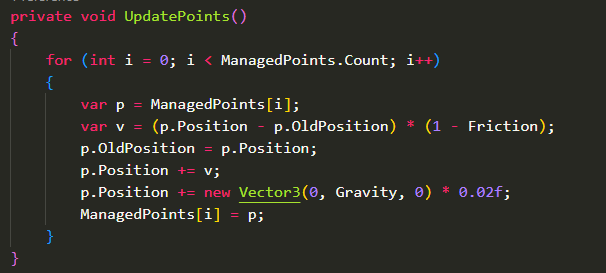
With Verlet integration, the next displacement of each object can be obtained from its current position minus its previous position. No additional velocity variable is needed. In other words, if we want to change the particle’s direction (for example, to make it bounce after hitting a wall), we modify the previously recorded position.

When the particle hits a wall in the image above, we can make it bounce by modifying OldPosition: set the most recent OldPosition to a point slightly outside the wall, and the next Verlet integration step will make the particle move back toward the inside of the wall.

Once basic movement is working, we can define gravity and the energy loss caused by friction after each collision with a wall.

Constraints
Real applications need different kinds of constraints. For example, we can define a constraint that keeps two particles at a fixed distance: when they are too far apart, move them toward each other; when they are too close, move them apart.
 {:.blog-post-md-img-half }
 {:.blog-post-md-img-half }
Using this constraint, we can arrange particles into a simple human shape. This is essentially how Hitman created its ragdolls, and the implementation is surprisingly simple.
 {:.blog-post-md-img-half }

We can also define constraints for handling collisions, or constraints that pin selected particles in place. The final code architecture looks roughly like this:

The code creates 30×30 particles and uses constraints to limit the distance between them. Pinning every particle in the top row produces a simple cloth simulation.

Optimization
The code in the screenshots above shows that the amount of computation grows significantly as the total number of particles increases. With a 30×30 grid, the program performs 900 + 3 * (450 + 900 + 900) calculations. Since these are all for loops, converting them to the Job System is straightforward: use IJobParallelFor to parallelize the calculations. (Be aware that some constraints depend on the order of previous constraints, so JobHandle is needed to express the dependencies between jobs.)


The original implementation needed 5 ms on the main thread to calculate four 30×30 cloths. After converting it to the Job System, the calculation time fell to 0.59 ms.
Splitting every type of constraint into an independent job and linking them with JobHandle makes the logic cleaner: the next type starts only after the previous type’s job finishes. However, it also increases the number of scheduled jobs. Scheduling itself has overhead, so with Burst Compiler on the CPU, and when the amount of data is not very large, a single job that calculates every constraint might actually be faster.

Demo
 📖The demo source code is here📖
Left: visualize the generated cloth particles.
Center: write the calculated result of every cloth particle back to the corresponding mesh vertex so the mesh can deform according to the Verlet integration result.
Right: generate particles and use pin constraints on the two particles at the left and right ends to create rope dynamics.
I later got bored and modified the underlying Graph UI code in Shader Graph, overriding edge rendering and replacing it with a collection of dot shapes whose displacement is calculated with the Verlet integration from this post. This makes the nodes appear to be connected by ropes.

Notes
This implementation calculates the next displacement using only the current and previous positions; it does not use velocity at all. The wiki describes another implementation called Velocity Verlet, which also looks fairly easy to write. Having velocity would probably give more complete control over simulations such as cloth (especially in games), and would avoid particles suddenly exploding when an object is moved manually. I took a quick look through what I think is the best Unity cloth plugin, Magica Cloth, and its source code also exposes velocity for users to control.
For cases that need simple rope or rope-like motion (seaweed, perhaps), this is still a good approach.
Collider calculations are another area that needs optimization. If many colliders need to interact, the workload grows rapidly. One solution is for each independent cloth to maintain a collider list containing only colliders that affect it; another is to use an algorithm such as a BVH to find colliders in the same space before calculating interactions.
References
5.13: What is Toxiclibs Verlet Physics? — The Nature of Code
Simulate Tearable Cloth and Ragdolls With Simple Verlet
Integrationhttps://pikuma.com/blog/verlet-integration-2d-cloth-physics-simulation