This post is a short set of notes I organized after reading Digital Images: From File to Screen. The example images are reproduced directly from that article. My main goal is to clarify what gamma correction does and the relationship between gamma correction and gamma encoding.
Linear color space
The definition of linearity is that if a color space is linear, multiplying a color by a variable (such as 3) multiplies that color’s brightness or luminance by the same variable (3). Here, linear refers to the relationship between a value and the brightness of the resulting color. In computer graphics, a renderer always represents the colors it processes in linear color space. If we could preserve linearity everywhere, things would be much simpler, but in practice we need to consider two factors: human vision and displays (unfortunately, displays are nonlinear). Let us begin with human vision.
Human vision
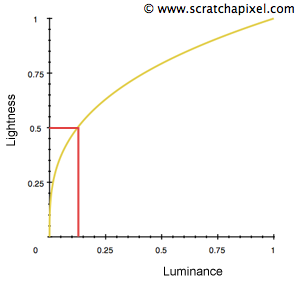
$$ lightness = luminance^{1/3} $$
Humans can perceive a very large range of light intensities, from 1 to 10 to the power of 10. We can see everything from a room with a single candle to a scene on a bright sunny day, but we cannot perceive every intensity in that range at the same time. For example, if we put a candle in a bright outdoor scene, it is difficult to notice any difference in the scene.
Our eyes handle such a wide range of illumination by changing their sensitivity to the overall brightness of a scene. The ability to adapt quickly to light intensity (mainly by dilating and contracting the iris) is called brightness adaptation. Human vision is also more sensitive to small changes in dark regions than to the same changes in bright regions. A light source with only 18% linear luminance looks to our eyes as if it has roughly 50% linear brightness (the grayscale comparison below makes this easier to see). This nonlinear perception of brightness is called lightness.
Displays and gamma correction
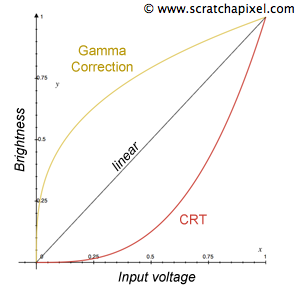
In the early days of computing, most displays used CRTs (cathode-ray tubes). The relationship between the voltage used to control each point on the screen and its brightness was not linear; it followed the concave curve shown in red in the image above. This nonlinear relationship between brightness and voltage can be expressed as:
$$ brightness = voltage^{\gamma} $$
The exponent in the equation above is called gamma. This was a serious problem because it made colors in darker regions even darker. To solve the gamma-exponent problem, people applied an inverse-gamma exponent to correct the result back to its original linear value. The correcting curve is called gamma correction.
With gamma correction, the equation becomes:
$$ {brightness} = \text{image}^{\frac{1}{\gamma}} \cdot \text{voltage}^{\gamma} \rightarrow \text{linear curve} $$
Since I am bad at math, let us verify this with 0.5 (assuming that a linear-space RGB color is (0.5, 0.5, 0.5)):
$$ \text{RGB is 0.5, after gamma correction}\rightarrow 0.5 ^{1/2.2} = 0.72974005284 $$
$$ \text{Stored RGB value }0.72974005284\text{ displayed by a CRT in gamma space}\rightarrow 0.72974005284^{2.2} = 0.499999 \text{ (restored to the original linear value 0.5)} $$
Gamma encoding
Modern displays no longer have the physical limitation that forced old CRTs to display only in gamma space. They can display colors correctly in linear space, but we still choose to display colors in gamma space for the following reason.
First, remember that the eye is less sensitive to changes in bright colors and more sensitive to changes in dark colors; human perception of brightness is nonlinear.
On a computer, each of the three color channels is stored with 8 bits, covering RGB values from 0 to 255. This gives 256 × 256 × 256 possible color combinations. A channel value of 0 is black, 128 is gray, and 255 is white. This relationship between the numeric values and colors is linear.
Because the eye is more sensitive to dark colors, we apply gamma encoding to the original linear colors. Under this curve, dark colors are allocated more space in the 8-bit range, while bright colors are stored at lower precision (the eye cannot perceive the difference anyway). As shown in the second grayscale row below, the eye can distinguish the color changes after gamma encoding better than the equivalent linear changes.

The gamma-encoding curve currently used by the industry is 1/2.2. It is defined to match the range of human perception and use storage space more efficiently. This happens to be the same curve we used to compensate for CRT displays, so even though modern displays can show colors in linear space, they still display them in gamma space. This is done to convert gamma-encoded colors back to linear values during display.
Conclusion
In summary, in the past, the 1/2.2 curve used for gamma correction compensated for the nonlinear brightness response of CRTs in gamma space. Today, screen output is still in nonlinear gamma space because we use gamma encoding (the 1/2.2 curve) when storing colors on computers. Displaying in gamma space then happens to convert those gamma-encoded colors back to linear values. The two identical curves have different purposes, but coincidentally produce the same final result, which is why they are often confused.
An sRGB color is a linear-space color converted by gamma encoding.
Common questions
Q: I am sitting in front of a computer monitor and looking at an image tagged as sRGB. In what color space is the color I observe?
A: Linear, ideally. The goal is for people to ultimately see linear colors. Do not overthink it; treat gamma encoding as a form of color compression.
The path from a computer color to the eye is:
- Use software X and look at the image on the screen (an sRGB image with the 1/2.2 curve) →
- The modern display automatically shows it in gamma space (the 2.2 curve) →
- The eye ultimately receives the color restored to linear space.
Q: What do Unity’s linear and gamma pipelines mean?
A: These two options affect the result of lighting calculations in shaders.
In the gamma pipeline, lighting strength is linear when calculated in the shader, but the color textures supplied to the shader are in sRGB space. A shader with a lighting model combines the linear lighting result with nonlinear sRGB color, producing an unrealistic color.
With the linear pipeline, when an sRGB texture is passed to the shader, the engine converts it back to linear space. Mixing the texture color with the linear lighting result then produces the correct color.
Q: When importing an image into a game engine, how do I choose between sRGB and linear?
A: Simply put, if the color in the image is meant to be seen by the user, use sRGB. If it is used for shader calculations, use linear.
Images intended for the eye: albedo/base/diffuse textures. Images used for shader calculations: specular, occlusion, and normal maps, etc.