📝 About ASP’s Render Passes
At the end of the 1️⃣ 1. Installation Instructions and Prerequisites, it is mentioned that :
ASP requires two basic Renderer Features: ASP Material Pass and ASP Depth-Offset Shadow. Add and enable both in the Renderer Data.
These Renderer Features are independent render passes. This page also explains the Cube Proxy, which requires no extra pass, and the optional ASP ShadowMap retained on legacy release lines.
Material Pass
Whenever a material of the character renderer uses ASP/Character or ASP/Eye as its target shader, that renderer will be rendered into the Material Pass.
The Material Pass’s render result is a RGBA32 texture:
| Channel | Data | Description |
|---|---|---|
| R | Material ID | For all ASP material of the character, the ASP Character Panel will assign an independent per-material ID. |
| G | Color Luminance | The color brightness of the renderer's albedo (including albedo map), which is a grayscale of color from 0 to 1. |
| B | Outline Weight | B channel value of Vertex Color, if set to 0, the outline will be forced to not be displayed. |
| A | None | Reserved for self-expansion. |
Material ID is very important. For example, screen-space outlines and other post-processing effects (such as tone mapping) rely on material IDs to correctly identify pixels belonging to ASP-rendered characters. This allows for the application of specific effects to those pixels, or optimizations by skipping pixels that don't require those effects.
In addition, the Material Pass also writes a separate depth map for the renderer. This is necessary because screen space shaders, like screen space outline, need depth information to determine if there are other objects (using non-ASP materials) in front of the character. Only then can they correctly apply the occlusion logic. This is also why screen space outline cannot be applied to translucent objects – they simply don't provide the depth data that these operation require.
Cube Proxy Self-Shadow Removal
The Cube Proxy is not a Renderer Feature and does not create another render pass or shadow texture. ASP/Character and ASP/Eye sample Unity's main-light shadow map at the surface of a proxy enclosing the character. This excludes self-shadowing caused by geometry inside the proxy while preserving shadows cast by objects outside it.
Enable Simple AABB Cube to Remove Self-Shadowing in the ASP Character Panel, then adjust Character Center Position Offset and Self Shadow Cutoff AABB Size until the proxy fully encloses the character.
ASP Shadow Map Pass (Legacy; Unity 2022.3, 6.0, and 6.3 only)
💡 This is an optional legacy workflow. Unity 6.5 removes the Renderer Feature and uses only the Cube Proxy. The ASP Character Panel shows
ASP ShadowMap (Legacy)only when it exists and is enabled; its absence is not reported asmissing.
When a character renderer's material uses the ASP/Character or ASP/Eye Shader, the shadows of these renderers will be written into the ASP Shadow Map. In other words, this is a shadow map that only contains characters, and does not contain shadows of dynamic or static objects that use other shaders.
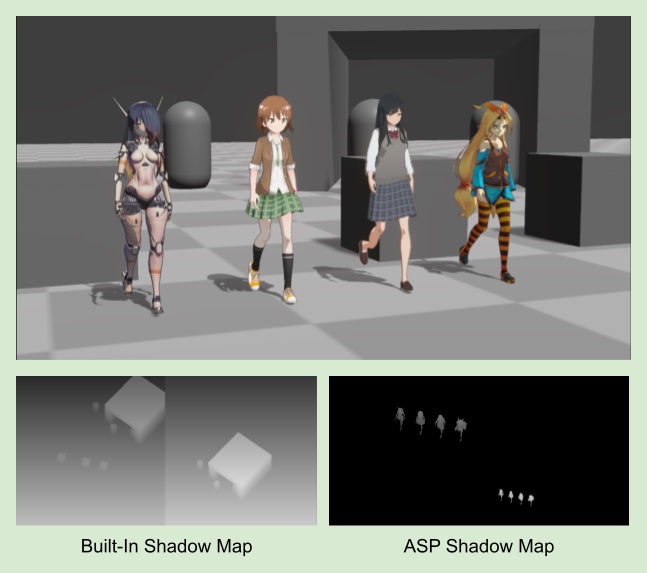
The ASP Shadow Map Renderer Feature provides some parameters for users to customize
| Parameter Name | Description |
|---|---|
| Character Shadow Map Resolution | The size of the ASP Shadow Map, with three sizes to choose from: 1024x1024, 2048x2048, and 4096x4096 |
| Clip Distance | The farthest rendering distance of the ASP Shadow Map |
| Cascade Count | The number of cascade of the Cascade Shadow Map, with support for up to 4 cascades. |
| Shadow Fade Ratio | The fade out level of the ASP Shadow Map, if set to 0 there will be no fade out at all, and when the distance from the camera exceeds the clip distance, you will see the shadow being clipped directly, the recommended setting is 0.5~1 |
ASP Depth Offset Shadow Pass
The forehead part of the character rendering in anime character usually has more detailed hair shadows, which is difficult to reproduce with traditional shadow maps.
At the same time, because ASP rendered characters usually do not have self-shadowing (especially on the face), we render the depth of hair that meet the set Layer and rendering layer mask to an RT, and sample this depth after offsetting it. By doing so, we get hair shadows on the face. The Depth Offset Shadow can be use to give character extra detail such as hair shadow, cloth shadow on the thigh..etc.
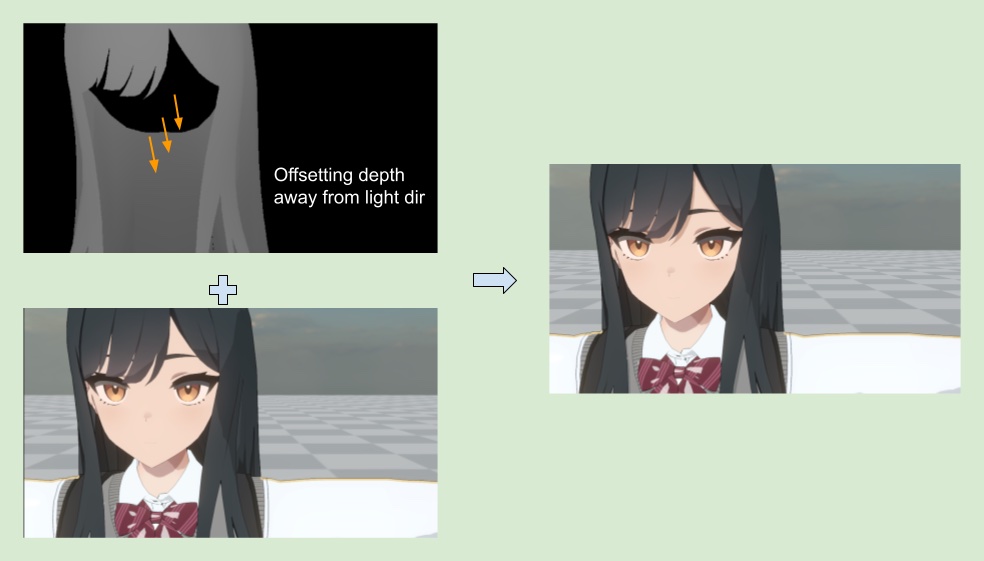
💡 If the same material is both the caster and receiver of a depth offset shadow, the ASP shader will use the material ID to avoid self-shadowing. Therefore, the same material will not receive the depth offset shadow cast by itself.