🚀 19. Building and Packaging Shaders - Important, read before you build project!
Before building the entire project, please make sure that the quality setting in 1️⃣ 1. Installation Instructions and Prerequisites points to the correct URP asset, and that the renderer data in the asset contains all the ASP-provided renderer features that are used.
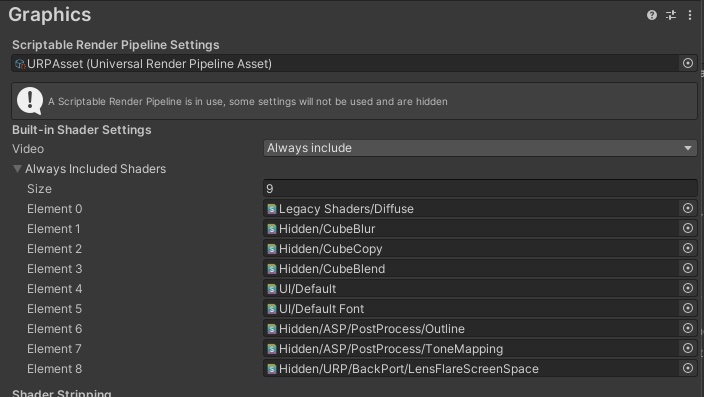
In the Project Settings->Graphics category, add the following 2 Shaders to always include:
Hidden/ASP/PostProcessing/Outline
Hidden/ASP/PostProcessing/ToneMapping
💡 If your version is 2021 or 2022, you need to include the following shader. For Unity 2023, it will use Unity's built-in screen space lens flare.
- Hidden/URP/BackPort/LensFlaresScreenSpace
Screen Space Shadow (Legacy Character-Only Shadow Map)
⚠️ This section applies only to the optional ASP ShadowMap legacy workflow on Unity 2022.3, 6.0, and 6.3. Unity 6.5 does not include this Renderer Feature or
Hidden/ASP/ScreenSpaceShadows.
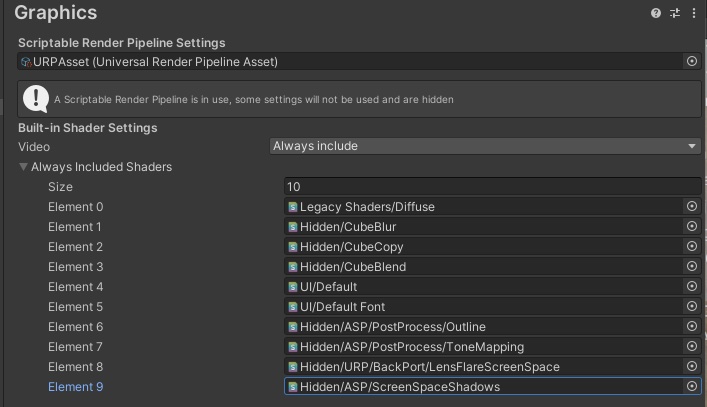
If you're using the Screen Space Shadowintroduced in version 1.20, you need to ensure thatHidden/ASP/ScreenSpaceShadows is included in the Always Included Shaders list inside the Project Settings. Otherwise, the screen space shadow shader will not be pakced into your project's executable.
Add Below shader to Always Included Shaders :
- Hidden/ASP/ScreenSpaceShadows
💡 If you've manually enabled the ASP shadow map renderer feature in the editor (with ASP v 1.20 and later), this shader will automatically be added to the Always Included Shaders list. If you don't see this shader in the always included shaders, you can add it manually.