9️⃣ Shadows
💡 For detailed explanations of Built-In Shadow, Cube Proxy, ASP ShadowMap (Legacy), and Depth Offset Shadow, see 🦇 Setup Character Shadow - ASP’s Shadow Solution (1.3 Update 2025/11/15).
⚠️
Receive Extra Shadow From ASP ShadowMapis effective only on Unity 2022.3, 6.0, and 6.3 release lines that still contain ASP ShadowMap. Unity 6.5 uses only the Cube Proxy for character self-shadow removal.
| Property Name | Description |
|---|---|
| Receive Built-In Shadows | Whether to receive shadows from the Unity default ShadowMap. |
| Receive Extra Shadow From ASP ShadowMap | Whether to receive shadow from ASP character shadow. |
| Receive Extra Shadow From Offsetted Depth Map | Whether to receive depth offset shadow from ASP material. |
| Depth Offset Shadow Pixel Distance | The offset distance of the depth offset shadow. |
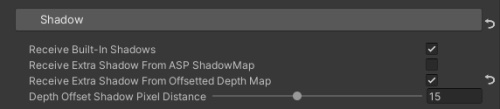
💡 The three shadow toggles above can be set individually for each material, but for the sake of convenient management of material parameters, it is recommended to uniformly set and manage all materials’ shadow behaviour for the current character on the ASP Character Panel’s component GUI.